Fixed-asset lifecycle for multi-branch enterprises
Asset Management System
An enterprise platform that manages the full lifecycle of fixed assets across branches: procurement, inter-branch mutation, employee handover, physical stock opname, monthly depreciation, and disposal or sale, with a configurable approval engine, data-driven RBAC, and a mobile app for field staff.
- Role
- Software Engineer · Backend, Web & Mobile
- Year
- 2026
- Type
- Client project
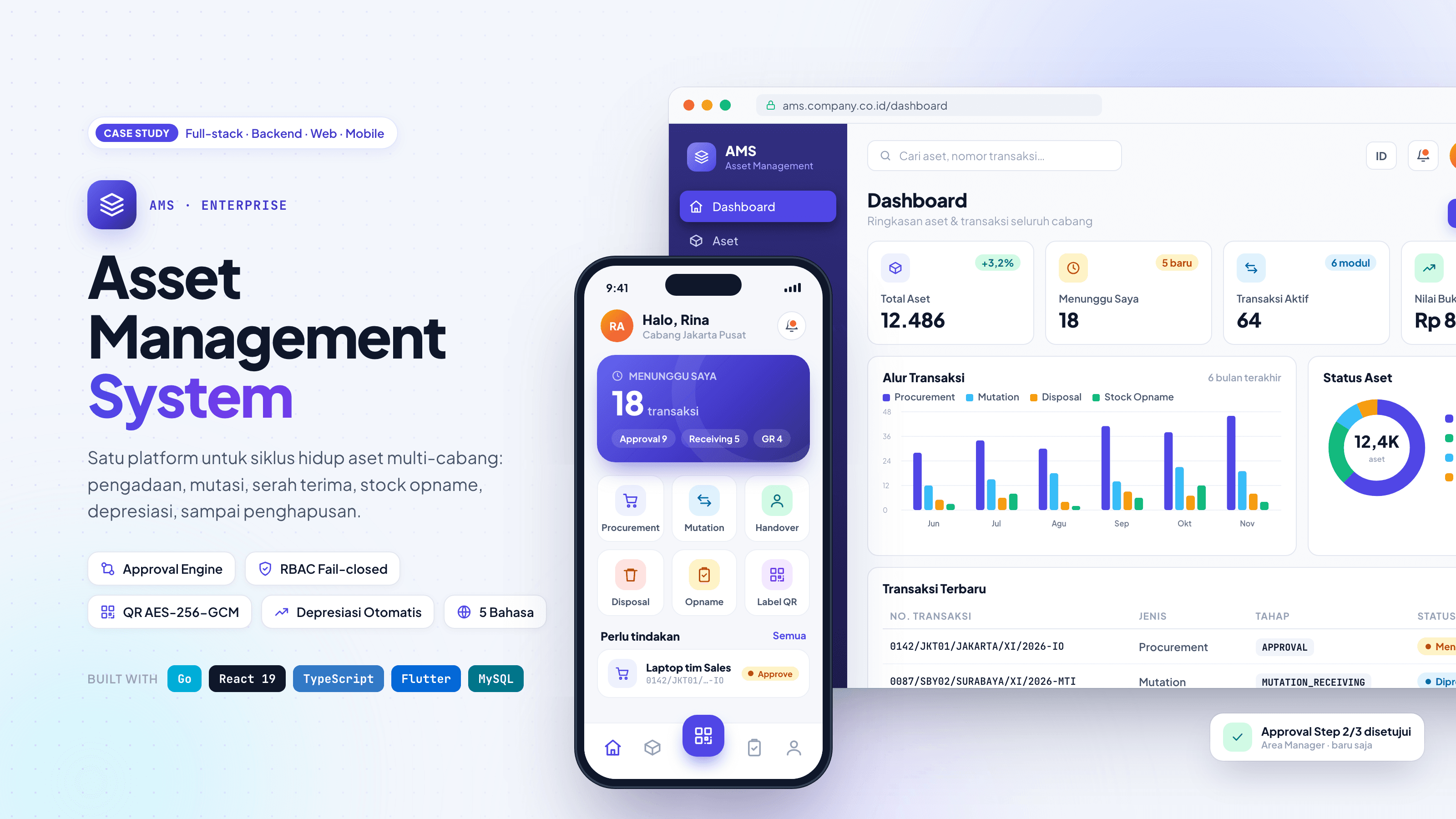
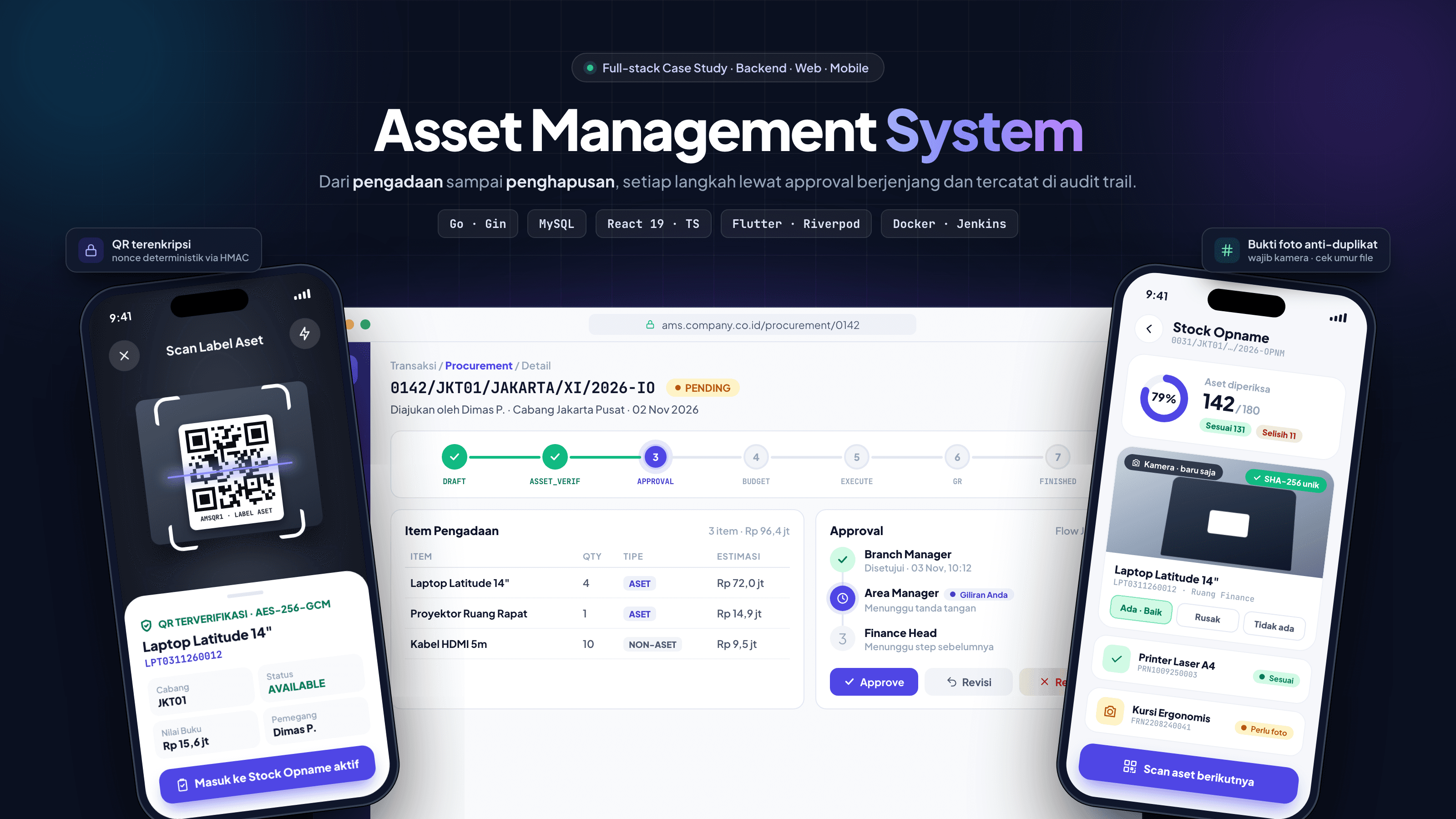
Client work under NDA: source code and live app are not publicly available.
6
Transaction modules
~270
REST endpoints
53
Data models
82
Versioned migrations
5
UI languages
4
Client platforms
Problem
Companies with many branches struggle to know where each asset is, who holds it, what its book value is, and whether buying, moving, or retiring it was approved by the right people. The process ran on scattered spreadsheets, emails, and paper.
Solution
One central system that models every asset activity as a transaction with a state machine and tiered approvals, and keeps a full audit trail of every change. It spans a Go REST API, a React web dashboard, and a Flutter app for field staff.
Problems Solved
Asset data scattered across branch spreadsheets, with no single source of truth at audit time
→Central asset master with unique asset numbers and a full history per asset
Procurement and disposal approvals via email or paper: slow, untraceable, easy to skip
→Multi-step approval engine configured per branch
Assets moved between branches without records and went missing on paper
→Mutation module with mandatory approval and receipt confirmation by the destination branch
Unclear which employee holds which asset, hard to recover when someone leaves
→Handover module (issue & return) with signed handover documents
Manual stock opname with photo evidence that could be faked
→Mobile stock opname with QR scanning plus photo age and uniqueness checks
Book values calculated by hand, making financial reports inaccurate
→Automatic monthly depreciation with locked periods
Asset sales involve Purchasing, Finance, and Tax, and steps got skipped
→Disposal flow with an ordered sell path: Purchasing → Approval → Finance → Tax
Key Features
Transaction Modules
- Procurement: draft → asset verification → approval → budget → asset creation → goods receipt
- Mutation, Handover, and Stock Opname with their own stage flows
- Disposal with separate dispose and sell paths, plus collective Disposal Agreements across branches
- Reject, return for revision (per line or whole transaction), and cancel on every module
Approval & Access
- Configurable multi-step approvals by role or user, per branch with fallback
- User-proposed custom approval flows verified by admins
- Data-driven RBAC (role → menu → permission) managed from a matrix in the UI
- "Waiting for me" inbox computed from permissions, approval turn, and branch
Documents & Notifications
- Required documents per stage and branch; transitions blocked until uploaded
- Email templates per transaction type, stage, and action
- Encrypted QR asset labels, printable from web and mobile
Finance & Reporting
- Straight-line and declining-balance depreciation per category or asset
- Procurement, Mutation, Disposal, and Stock Opname reports
- Multi-sheet .xlsx exports, including book-vs-physical reconciliation
Data Onboarding
- Bulk Excel import for assets, branches, users, and members
- Server-generated templates, dry-run validation, per-row error reports
Mobile App (Flutter)
- Scan an asset QR to jump into the active stock opname or asset detail
- Stock opname findings with live camera photos only
- Approve, reject, or revise every module from the phone
- Goods receipt, mutation receipt, and handover with document upload
- In-app update check against admin-uploaded releases
System Design & Architecture
A layered Go backend (routes → middleware → controllers → services → GORM → MySQL) serves a React 19 dashboard and a Flutter app over REST with a single response envelope. The web uses Atomic Design with TanStack Query for server state; the mobile app follows a feature-first clean architecture where the domain layer depends on neither Flutter nor the HTTP client. A cron scheduler runs monthly depreciation.
Clients
- React 19 + Vite web dashboard
- Flutter app (Android, iOS, macOS)
Backend (Go + Gin)
- JWT, role & permission middleware
- Services: state machine, approval engine, reports, import
- Cron scheduler for depreciation
Data
- MySQL 8
- Document storage on a persistent volume
External
- SMTP email
Tech Stack
- Backend
- Go 1.25, Gin, GORM, MySQL 8, golang-jwt, bcrypt, robfig/cron, excelize, Goose migrations
- Web
- React 19, TypeScript, Vite 7, TanStack Query & Table, Zustand, React Router 7, React Hook Form + Zod, Tailwind CSS, Recharts, dnd-kit, i18next, Cypress
- Mobile
- Flutter 3.35, Riverpod 3, go_router, Dio, secure storage, mobile_scanner, image_picker, fl_chart, mocktail
- Infra
- Docker (multi-stage, non-root), Docker Compose, Jenkins, Makefile, Vercel
Technical Deep Dive
01One generic state machine for every transactionAll modules share one transaction header table and one append-only stage log; each module only adds its own detail table.+
- Stage transitions are validated so an action only runs in the right stage
- Stages map to business statuses automatically (e.g. APPROVAL → PENDING, FINISHED → APPROVED)
- Every move records who, when, from which stage to which, and the note
- Adding a module like Handover only means defining its stages and rules; tracking, audit, and approvals come for free
02A reusable approval engineApproval chains are data, so each branch can have its own without code changes.+
Creator submits ─► module service ─► InitiateApproval(flow_code, branch)
  resolve flow: user custom > user-specific > branch > ALL
  step 1 pending (by role or user) ─► approve ─► next step …
  all steps approved ─► auto-complete hook ─► module moves to next stage
- Steps support required/skippable flags, sender/receiver manager structure, and type/category filters
- Approvers must belong to the creator's branch
- Each sign or reject is stored with IP and user agent as audit evidence
- Disposal Agreements reuse the same engine with no schema change
03Data-driven, fail-closed RBACAccess rules live in the database and are checked on every request.+
0 Auth        JWT access + rotating refresh tokens, revocable per device
1 Role        RequireRole("admin", …) for admin features
2 Permission  request path normalized → matched to menu route → permissions merged across roles
3 Transaction is the user this step's approver, the creator, or in the branch?- Fail-closed: endpoints not registered as a menu are rejected
- Permissions are read from the DB, not token claims, so changes apply without re-login
- Hidden 'permission' menus let action endpoints be controlled without creating a page
04"Waiting for me" computed on the serverOne source of truth for who has to act, shared by the web and mobile clients.+
- Combines which stages the user's role may handle, whose approval turn it is, and branch scope
- The server returns a waiting_for_me flag, so the logic isn't duplicated in two clients
05Encrypted QR labels (AES-256-GCM)QR codes carry an encrypted payload, not a plain asset number.+
- Encryption and nonce keys are derived from one secret with separate domain labels
- Deterministic nonce from an HMAC of the asset number, so reprinted labels are identical; safe because the same nonce only ever encrypts the same plaintext
- Format version bound as additional authenticated data
- Generic scanners see random text; the app recognizes the prefix and resolves it via the API
06Trustworthy stock opname evidencePhoto evidence can't be recycled or faked.+
- File size limit and configurable maximum photo age
- SHA-256 dedup: the same photo can't back two assets in one stock opname
- Mobile requires a live camera photo
- Only one active stock opname per branch, and an asset can't sit in two running ones
- Trade-off: EXIF capture dates were dropped because they vanish when photos pass through chat apps; file modified time is looser but far more reliable in the field
07Race-safe document numberingTwo simultaneous requests never get the same number.+
- Transaction numbers like {seq}/{branch}/{roman month}/{year}-{suffix} are reserved with delayed → used / expired states
- Asset, internal-order, and document numbers use counters locked with SELECT … FOR UPDATE
08Locking assets during transactionsAn asset can't be in two conflicting processes at once.+
- Assets in a mutation, disposal, or handover draft get IN_MUTATION / IN_DISPOSAL / IN_HANDOVER
- The previous status is stored on the detail row and restored on reject or cancel
09Value history & depreciationAsset values are a time series that's never overwritten.+
- Snapshots of book value, accumulated depreciation, condition, and status with one active row per asset
- Every change stores before/after JSON in an asset history log
- Depreciation is idempotent per period; a monthly cron computes the previous month and locks it
10Excel import with dry-runSafe bulk onboarding from legacy spreadsheets.+
- Server-generated templates with notes and reference sheets of valid values
- Dry-run validates the whole file without saving and returns structured per-row, per-column error codes the UI can translate
- Create and update modes, saved inside one DB transaction
11Stock opname reconciliation reportAn 8-sheet .xlsx comparing book records against physical counts.+
- Rows that can't be computed yet are sent with supported: false instead of a silent 0
- So nobody mistakes a missing number for a real zero
12Race-safe token refresh on both clientsMany simultaneous 401s trigger exactly one refresh.+
- Web: axios interceptor with a failed-request queue that replays everything after one refresh
- Mobile: Dio QueuedInterceptor with the same pattern; failed refresh emits a session-expired event and the router sends the user to login
- Tokens live in Keychain/Keystore on mobile
Challenges & Lessons
Every branch has its own approval chain, and the rules keep changing
Approval flows stored as data (flow code + branch + steps) with an ALL fallback, managed from the UI
Modeling business processes as data survives changing requirements far better than hard-coded rules
Permissions must change without a deploy or re-login
Permissions mapped to route paths in the DB and checked per request, fail-closed
Read authorization from the source of truth, not from a token issued yesterday
'Whose turn is it' logic risked being duplicated in web and mobile
Centralized on the backend as waiting_for_me / can_confirm_receiving flags
With more than one client, authorization and turn logic belong in one place: the server
Stock opname photos could be reused
SHA-256 dedup, file age limit, camera-only capture on mobile
Overly strict validation (EXIF) can break field UX; balance security with reliability
Schema evolving fast over 9+ months
Versioned SQL migrations (82 with Goose), AutoMigrate disabled
Explicit, reviewable schema changes beat convenient magic
Ongoing Improvements
- Push notifications (FCM token model already in place)
- Object storage (S3/GCS) for documents instead of local disk
- Structured logging, monitoring/APM, and rate limiting
- Wider automated test coverage for services and transaction flows
Next project
DirtyRat Studio